Bobbie Goods Coloring Pages: Procreate Digital Art Masterpiece
For digital artists and parents looking for creative activities for children, Bobbie Goods coloring pages Procreate offers a perfect blend of nostalgia and modern technology. This digital approach allows users to color intricate line art on an iPad, eliminating the mess of traditional supplies while providing endless color palettes. The combination of charming illustrations and the versatility of the Procreate app creates a dynamic and satisfying artistic experience.
What are Bobbie Goods Coloring Pages?
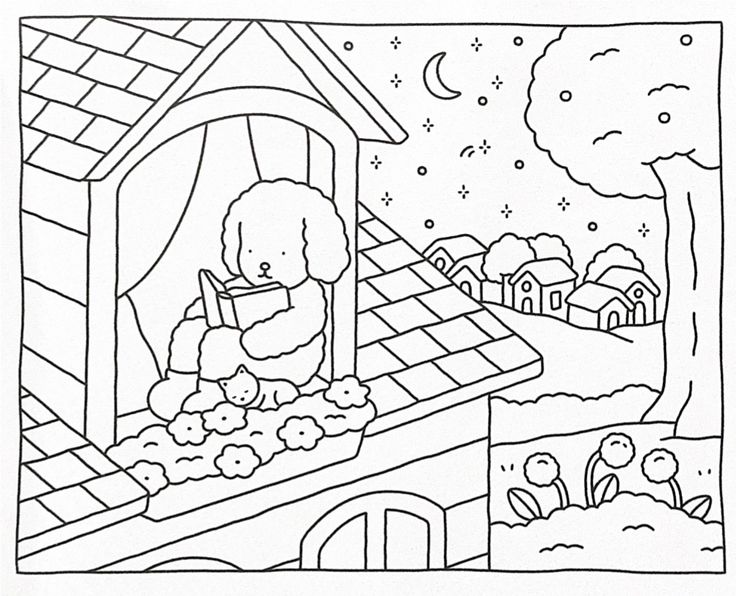
Bobbie Goods is a popular illustration brand known for its beautiful, hand-drawn line art featuring animals, plants, and scenic landscapes. These designs are celebrated for their intricate details, fluid linework, and whimsical charm. Originally created as physical coloring books, the artwork has been adapted for the digital realm, allowing artists to explore the images using software like Procreate on an iPad. The digital format preserves the elegance of the original sketches while adding layers of convenience and creative freedom.
The Procreate Advantage
Procreate is a powerful digital illustration app that provides a professional-grade toolkit for artists. When applied to Bobbie Goods line art, it transforms the coloring process into a sophisticated digital workflow. The app’s vast library of brushes mimics the texture of watercolor, ink, and pencil, giving digital coloring a tactile, organic feel. Layers allow for non-destructive editing, meaning users can experiment with colors and shading without the fear of ruining the original line art.


Benefits of Digital Coloring
Transitioning from physical coloring books to digital platforms like Procreate offers distinct advantages for both hobbyists and professionals. The digital environment eliminates the need for physical storage, cleaning supplies, and the worry of colors bleeding through the paper. Furthermore, the ability to undo mistakes, adjust brush sizes instantly, and create complex color schemes with a color picker significantly speeds up the creative process. This makes the art form accessible for quick projects or deep, immersive sessions.
Getting Started with the Files
To begin, users must first acquire the digital Bobbie Goods coloring pages, which are typically sold as printable PDF files or digital downloads. Once the line art is secured, it is imported directly into the Procreate app. The process usually involves saving the image to the device’s camera roll and then using the "Add" button within Procreate to insert the image onto a new canvas. This initial step bridges the gap between the physical design and the digital canvas.


Optimizing Your Coloring Experience
To achieve the best results, organizing the digital file properly is essential. Experienced users often utilize layers to separate the line art from the color layers or to work on different elements of the illustration independently. For example, one might lock the transparency of the line art layer to prevent accidental drawing outside the lines, while using multiple layers beneath to build up color and value. Adjusting the canvas settings, such as the color profile, can also ensure that the final image looks vibrant on any screen or print output.
| Feature | Traditional Coloring | Procreate Digital Coloring |
|---|---|---|
| Materials Needed | Physical book, pencils, markers, crayons | iPad, Apple Pencil, Procreate app |
| Error Correction | Limited (requires erasing or covering) | Unlimited (undo/redo functions) |
| Color Flexibility | Limited by available physical supplies | Infinite palette with adjustable opacity |
Sharing and Preserving Artwork
One of the significant benefits of creating art digitally is the ease of sharing and archiving. Once a Bobbie Goods coloring page is finished in Procreate, the final artwork can be exported as a high-resolution JPEG or PNG file. This allows artists to share their creations instantly on social media platforms or via messaging apps. Additionally, digital files occupy minimal physical space, allowing an artist to build a vast digital gallery of their colored work without the risk of damage or physical degradation over time.



Related Articles

Bobbie Goods Coloring Book Procreate: Digital Art Mastery
For digital artists and coloring enthusiasts, Bobbie Goods has become a beloved name in the world of printable art. Her signature line of intricate, hand-drawn...

Free Bobbie Goods Coloring Pages for Kids – Fun & Printable Art
Parents and educators constantly seek enriching activities that entertain while fostering development. Bobbie Goods coloring pages for free provide an...
Free Bobbie Goods Coloring Pages for Kids – Fun & Easy to Print
Parents and educators seeking enriching activities for children will find immense value in a bobbie goods coloring page free. These specific printables...
Free Printable Bobbie Goods Coloring Pages PDF – Fun for Kids!
Parents and educators navigating the digital landscape for enriching activities for children are often on the lookout for high-quality, accessible resources...

Stranger Things Coloring Book: Official Bobbie Merch & Art Pages
Amid the sprawling catalog of fan-driven merchandise inspired by Netflix’s genre-defining series, the Stranger Things coloring book Bobbie Goods collection has...
Bobbie Goods Free Coloring Book: Fun Downloadable Pages for Kids
Discover the world of Bobbie Goods free coloring book, a creative resource designed to inspire artistic exploration for both children and adults. This...